
Microservices Orchestration

As introduced previously, in a microservice-based approach, each microservice owns its model and data so it will be autonomous from a development and deployment point of view. These kinds of systems are complex to scale out and manage. Therefore, you absolutely need an orchestrator if you want to have a production-ready and scalable multi-container application.
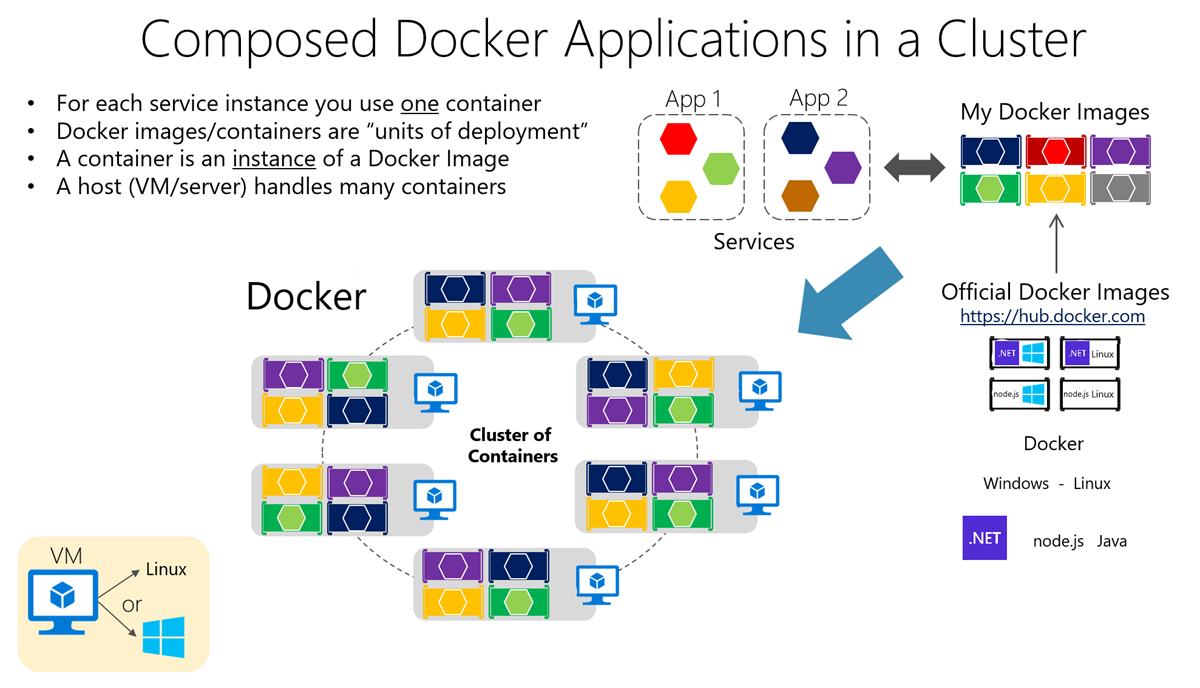
Diagram showing docker applications in a cluster.


  • The orchestrator helps with composing applications consisting of many microservices into one deployable unit. That unit is then moved — or deployed — to a host.
  • Once deployed, the orchestrator helps with managing the host. 
    • It can automatically start the containers,
    • scale them out with multiple instances for each image, 
    • suspend them, 
    • or shut them down when needed. 
    • The orchestrator can also control how containers access resources like the network and data storage.
  • Orchestrators can perform tasks such as 
    • load-balancing and routing in scenarios when multiple containers exist on multiple hosts in a complex distributed system
    • They can also monitor the containers' and hosts' health
  • Some examples of orchestrators:
    • Docker Compose
    • Kubernetes 

Comments

Popular posts from this blog

Networking in Kubernetes

Pods that are running inside Kubernetes are running on a private, isolated network. By default they are visible from other pods and services within the same Kubernetes cluster, but not outside that network Every Pod has a unique IP address And it is reachable from all other Pods in the K8s cluster A pod is a host, just like your laptop, having an ip-address and a range of ports that can be alloted to containers A container runs on a specific port inside a pod In a Kubernetes environment, when services are deployed within the same namespace , they can communicate with each other using the service name as the hostname e.g. in the following snippet from appsetting.json form a .net core project, ' document-api'  is the name of the service "DocumentApiConfiguration" : { "BaseUrl" : "http://document-api/" } What if I want to access a service from another namespace? When you want to access a service from another namespace in Kubernetes, you typica...

Terraform

It is an Infrastructure as Code tool Normally, if one has to configure VMs or other resources on the cloud, they have to go to the cloud provider's website and click a lot to get things done as supposed, terraform can do all of that provided you tell it precisely what to do in a .tf file e.g. which cloud provider you are using(GCP, Azure etc), which resource to configure with what specifications. One writes the file in hashicorp language (kinda like JSON) Free and Open source One has to install the CLI terraform init terraform apply  (to make the changes to cloud) terraform destroy

Kubernetes

Some keywords: Node A Node is a worker machine in Kubernetes and may be either a virtual or a physical machine, depending on the cluster Clusters Kubernetes coordinates a highly available cluster of computers (nodes) that are connected to work as a single unit Namespace Namespaces are a way to organize clusters into virtual sub-clusters — they can be helpful when different teams or projects share a Kubernetes cluster . Any number of namespaces are supported within a cluster , each logically separated from others but with the ability to communicate with each other Kubernetes: Kubernetes is a portable, extesible open-source platform for managing and orchestration containerized workloads . It abstracts away complex container management tasks Provides us with declarative configuration to orchestrate containers in different computing environments This orchestration platform gives you the same ease of use and flexibility you might already know from Platform-as-a-Service (PaaS) or Infrastruct...